
Export and reports
Your data is yours: take all of it with you, or make a report for the insurance company.
Admins only: Settings › Export & Reports.
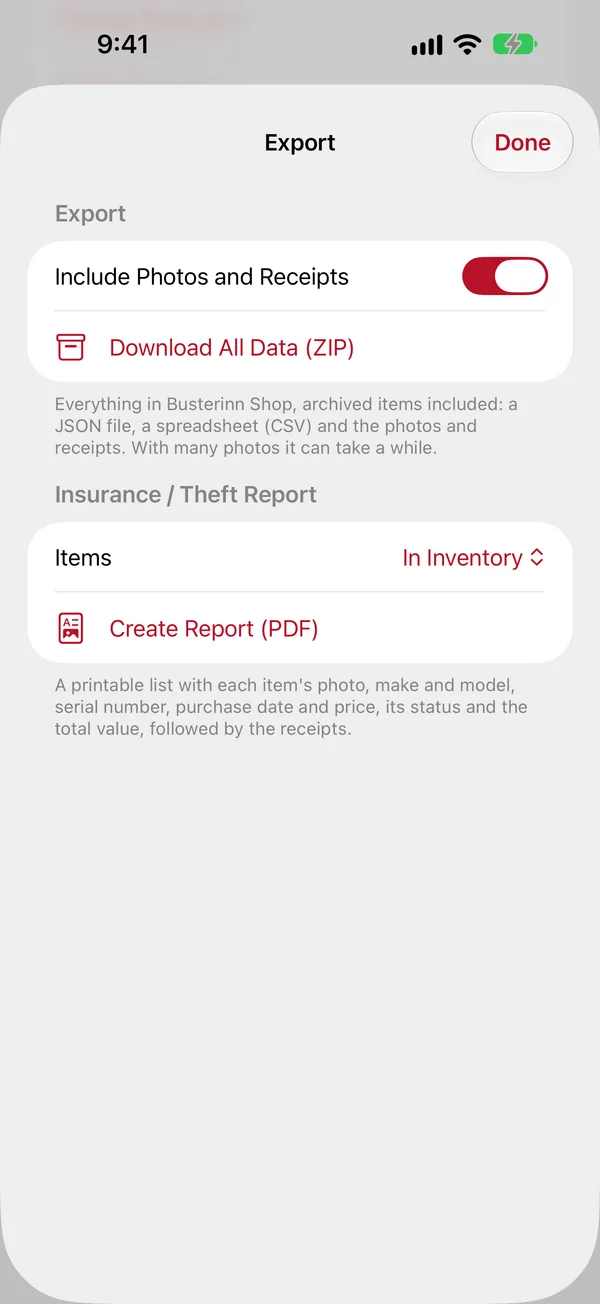
Download all data
- Turn on Include Photos and Receipts if you want those too (the file gets bigger).
- Tap Download All Data (ZIP) and wait a moment.
- Tap Share or Save … to save it to Files, AirDrop it, or email it.
The ZIP has a spreadsheet of every item, archived ones too (inventory.csv, opens in Numbers or Excel), the complete data with locations and each item's stock history (inventory.json), and the photos and receipts.
Insurance / theft report
A PDF listing each item with its photo, make and model, serial number, price, purchase date and status, with a total, followed by the receipts. Ready to hand to an insurer or the police.
- Under Insurance / Theft Report, pick which Items: In Inventory, Lost and Stolen, All Archived, or Everything.
- Tap Create Report (PDF), then Share or Save ….
Tip: the report is only as good as what's recorded. For valuable
things, add a photo, the serial number, the price and the receipt when you buy them,
not after they're gone.